
Multi-currency budgeting, without the headache
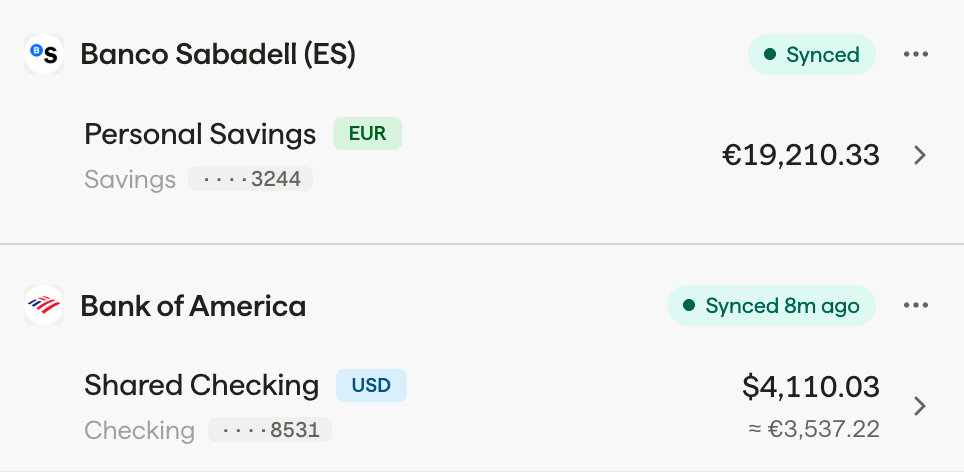
Connect international bank accounts into one dashboard. See your spending in your home currency, or toggle to view original amounts. Exchange rates update daily.
The problem with single-currency budgeting
Most budgeting apps assume you live in one country and spend in one currency. That's fine for most people. But if you're an expat in Spain with a Chase account and a CaixaBank account, things fall apart fast.
YNAB forces you to pick one base currency. Your EUR 47.50 dinner becomes $51.23, or whatever today's rate happens to be. By next month, that same dinner might show as $49.80. Your budget numbers shift even though your actual spending hasn't changed.
PocketSmith handles multi-currency, but treats it as an afterthought. Spreadsheets work until exchange rates change and your formulas break.
Borderless Budget was built to solve exactly this. Your EUR spending stays in EUR. Your USD spending stays in USD. And you always have a clear total in your home currency.
How multi-currency budgeting works
Connect your accounts
Link your bank accounts from any supported country. Your US accounts connect through our regulated banking providers, as do your European accounts. Each account keeps its native currency.
Set your budget in your home currency
Create budget categories and set amounts in your home currency. Transactions from foreign accounts are converted automatically using daily exchange rates. Toggle any transaction to see the original amount, so you always know what you actually paid.
See your total picture
Your budget and category totals are always in your home currency, giving you a clear overall picture. On individual transactions, toggle between home currency and original currency views, see both what it means for your budget and what you actually paid. Exchange rates update daily.
One budget, every currency
Your budget lives in your home currency. Your international spending fits right in.
Home Currency Budgets
Set all your budget categories in your home currency. No juggling amounts across EUR, USD, and GBP. One clear number per category, one clear total.
Why it works
Simple, consistent budget amounts that don't shift with exchange rates
Original Currency Toggle
On any transaction, switch between your home currency and the original currency it was spent in. See what you actually paid at the restaurant in Madrid, not just the converted amount.
Why it works
Never lose sight of what you actually spent locally
Daily Rate Updates
AutomaticExchange rates update every day. Your converted transaction amounts stay accurate without you lifting a finger. No stale rates, no manual updates.
Why it works
Accurate conversions you can trust, updated automatically
Exchange rates you can trust
We pull exchange rates daily from central bank sources, the same data banks and financial institutions use. No markup, no hidden fees on rates.
For currency pairs not directly quoted, we use cross-rate triangulation. Converting USD to GBP? We calculate it through EUR-to-USD and EUR-to-GBP rates. The math is transparent and the results are accurate to the rates major banks use, see exactly how Borderless Budget calculates exchange rates.
Your budget categories and totals are always in your home currency, so the big picture is always clear. When you want to see what you actually paid in the local currency, just toggle the view on any transaction. You never lose sight of what you actually spent.
Learn more
The Complete Guide to Multi-Currency Budgeting , Three methods for managing money across currencies, with a step-by-step setup.
How Borderless Budget Calculates Exchange Rates , Where our rates come from, how cross-rate triangulation works, and how we handle missing or stale rates.
Multi-currency budgeting questions
Your budget shouldn’t need a passport
Budget across every currency your life touches
Join the waitlist for early access. 30-day free trial with full access.
No spam, just launch updates.