
Related articles
Track your own money with Borderless Budget
Every account stays in its own currency, and every total adds up in yours. The first 30 days are free.
Get startedSteps to reauthorize a bank connection that has stopped syncing.
Every account stays in its own currency, and every total adds up in yours. The first 30 days are free.
Get startedBank data providers periodically require you to reauthorize your connection, typically every 90 days. When that happens, your transactions stop importing until you reconnect.
Open the Accounts screen. A connection that needs attention shows Reconnect under the institution name on its card; a healthy connection shows nothing there. While any connection needs you, Accounts in the navigation carries a small dot. Other connections continue to sync normally; only the flagged ones require action.
The account page of each account under that connection shows a card above the balance that says the bank needs you to sign in again, with the same Reconnect link.
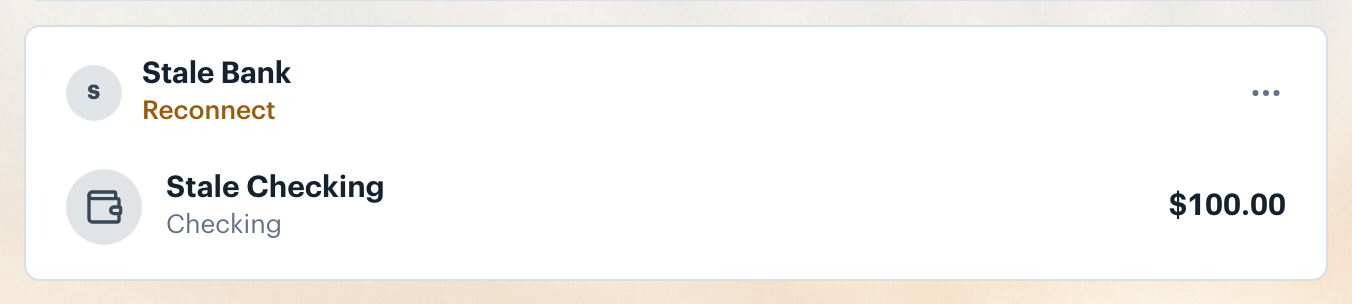
Click Reconnect. Borderless Budget opens a window titled Reconnect with your bank's name, then your bank's secure sign-in (the Plaid window for banks in the United States and Canada), with your previous account selections pre-filled, so reconnecting takes about thirty seconds. Sign in with your bank's credentials and approve data sharing again.
Reconnect disappears once your bank confirms the new sign-in. New transactions begin importing within a few minutes. Any historical transactions from the gap window are backfilled automatically.
If Reconnect still shows, or transactions still do not import after an hour, email [email protected].
👋 Still have questions? Email [email protected].