
Related articles
Track your own money with Borderless Budget
Every account stays in its own currency, and every total adds up in yours. The first 30 days are free.
Get startedAn investment account's Lots section shows the shares you bought and what they cost, and the Realized gains report matches each sale in a year to its lots and takes what you paid for any sale that needs a cost.
Every account stays in its own currency, and every total adds up in yours. The first 30 days are free.
Get startedSteps to check an investment account's lots, add an opening lot for shares bought before your history starts, and read the Realized gains report. Both are records for you or your tax preparer: Borderless Budget never works out tax.
Open an investment or brokerage account from the Accounts screen. The Lots section sits after Holdings and lists, for each holding, the shares you still hold by purchase date, with each lot's cost and US basis.
Lots come from your institution's lot records when a connected account has them. Otherwise they come from the buys and sales in the account's activity (From your activity) and the opening lots you add (Opening lot). A sale uses up the oldest lots first, unless your institution's lot records show which ones it sold. A line under each holding says whether the lots cover all the shares you hold.
To remove an opening lot, click Delete beside it.
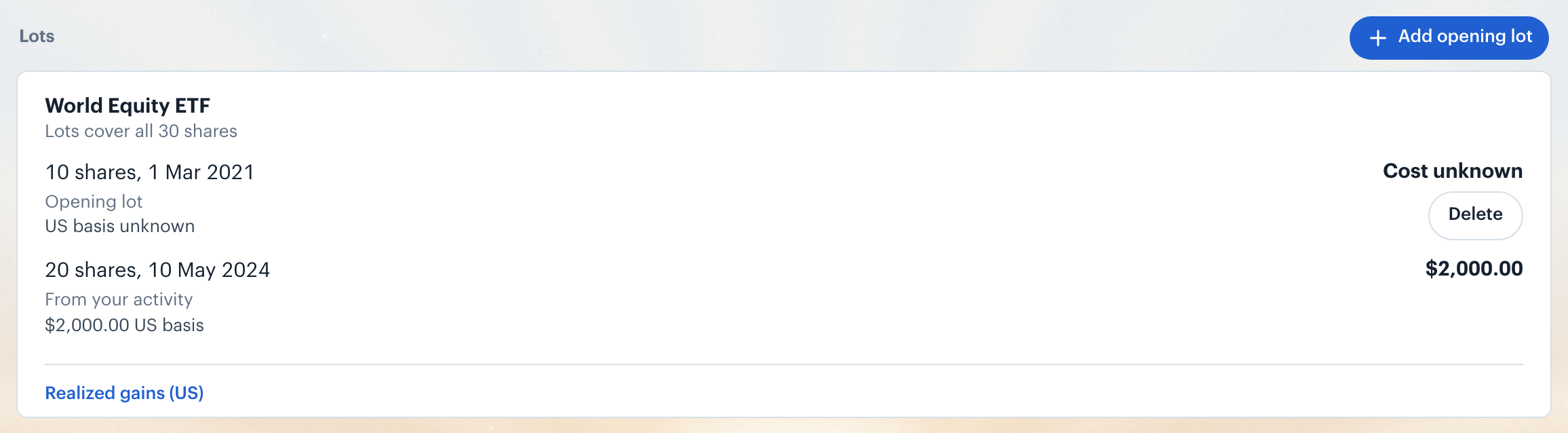
Note: When a connected account sends its own lot records, those are used instead and opening lots don't count.
When your lots' cost doesn't match the cost basis you entered for a manual holding, the holding's sheet on Investments shows both. See Tracking Holdings in a Manual Investment Account.
Click Realized gains (US) at the bottom of the Lots section. It's also a card on the Tax reports page (Account list options on the Accounts screen, then Tax reports), and the Realized gains tab of every tax report.
The title holds the year, as in Realized gains for 2025. Click the year to pick another.
The summary box leads with the Net realized gain for the year in US dollars, split into short-term and long-term, and beside it the proceeds and gains it adds up. When a sale's cost is missing, the box says Not known yet, or counts the sales it leaves out, and says Why, such as an account whose history here starts after you bought the shares.
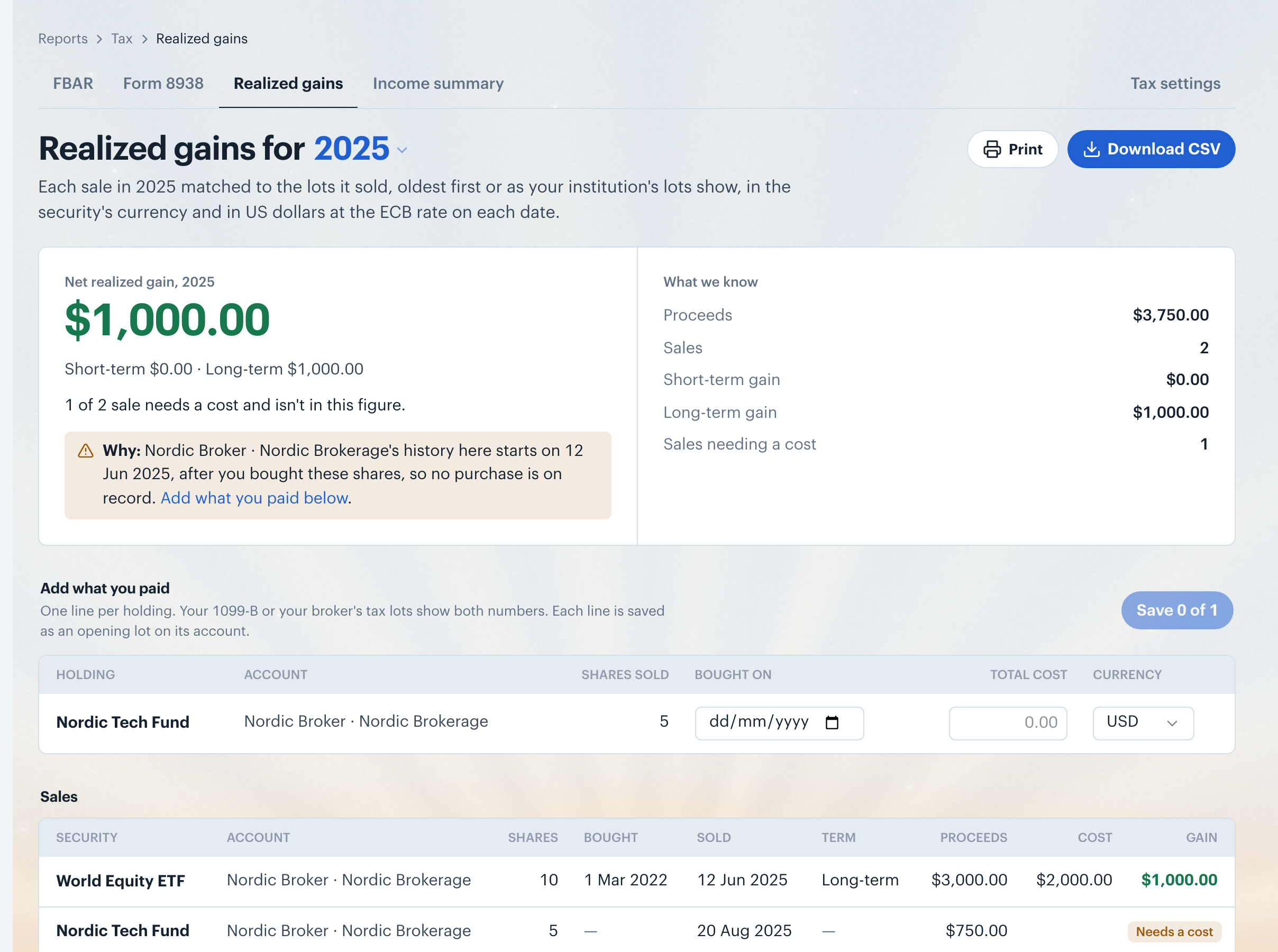
Sales lists each sale with the shares sold, when they were Bought and Sold, whether the gain is Long-term or Short-term, and its Proceeds, Cost and Gain in US dollars, at the exchange rate on each date. For a security priced in another currency, its own-currency amount shows under each dollar figure. A sale whose cost is missing reads Needs a cost.
When sales need a cost, Add what you paid lists one line per holding. Enter the date you bought the shares in Bought on and the Total cost, check the Currency, then click the Save button, which counts the lines ready, such as Save 1 of 1. Your 1099-B or your broker's tax lots show both numbers. Each line is saved as an opening lot on its account, and the report counts the sale.
Click Download CSV for one line per sale, or Print for a copy of the page.
If you file in Sweden, the report adds a Sweden section at the average cost, in kronor. ISK, KF and pension accounts are left out of it. The report is part of a subscription, and its figures unlock with your first payment.
Recording buys and sales? See Tracking Investment Activity.
👋 Still have questions? Email [email protected].