
Related articles
Track your own money with Borderless Budget
Every account stays in its own currency, and every total adds up in yours. The first 30 days are free.
Get startedSteps to choose the countries you file taxes in, then answer, in one grid per country, only what those countries' tax reports need for each account. Each answer saves on its own.
Every account stays in its own currency, and every total adds up in yours. The first 30 days are free.
Get startedSteps to give the tax reports the answers they need. Open the Tax settings page from the … menu on the Accounts screen, from Settings, or from the Tax settings tab at the end of any tax report. It's open with or without a subscription.
The page starts with Which countries do you file taxes in?. Click United States, Sweden, or pick another from Another country. Click a chosen country again to remove it; the last one can't be removed.
Until you choose, a line under the countries says what your reports assume, such as "Until you choose, your reports assume the US." Removing a country keeps its answers, so choosing it again brings them back.

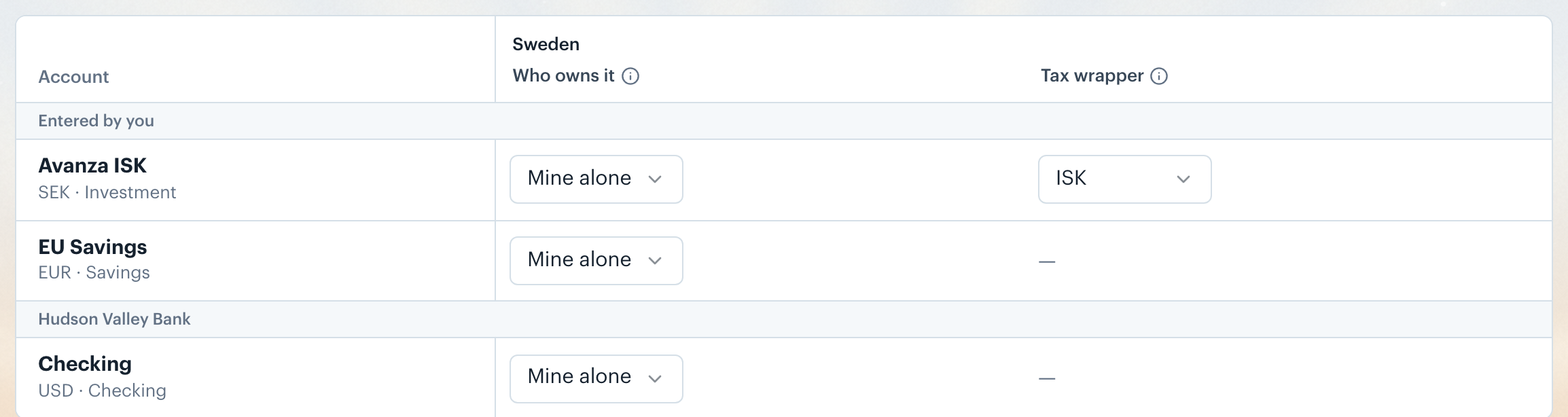
Your accounts has one grid per country you file in, headed by the country's name. Each grid lists your accounts as rows, grouped by bank, and that country's questions as columns, so a question sits in the same column for every account. A dash marks a question an account isn't asked. Click a column's name, such as In the FBAR, for a plain explanation of how to answer it.
For the United States:
Other countries ask Who owns it and, on investment accounts, Tax wrapper, such as ISK for Sweden.
Each answer saves on its own as you make it, and only you see it.
When any account has a question left open, a line above the grids counts the accounts that need an answer, and the open answers are outlined. Click Show only these to list just those accounts, and Show all to bring the rest back.
An account's Edit account sheet ends with a Tax line summarising its answers, such as "Taxed in the US and Sweden · ISK". Click Edit in Tax settings to open the page at that account.
Next: open your reports from the Tax reports page. See Tax Reports Overview.
👋 Still have questions? Email [email protected].