
Related articles
Track your own money with Borderless Budget
Every account stays in its own currency, and every total adds up in yours. The first 30 days are free.
Get startedSteps to share a budget: invite members by email, resend or revoke invitations, and remove members.
Every account stays in its own currency, and every total adds up in yours. The first 30 days are free.
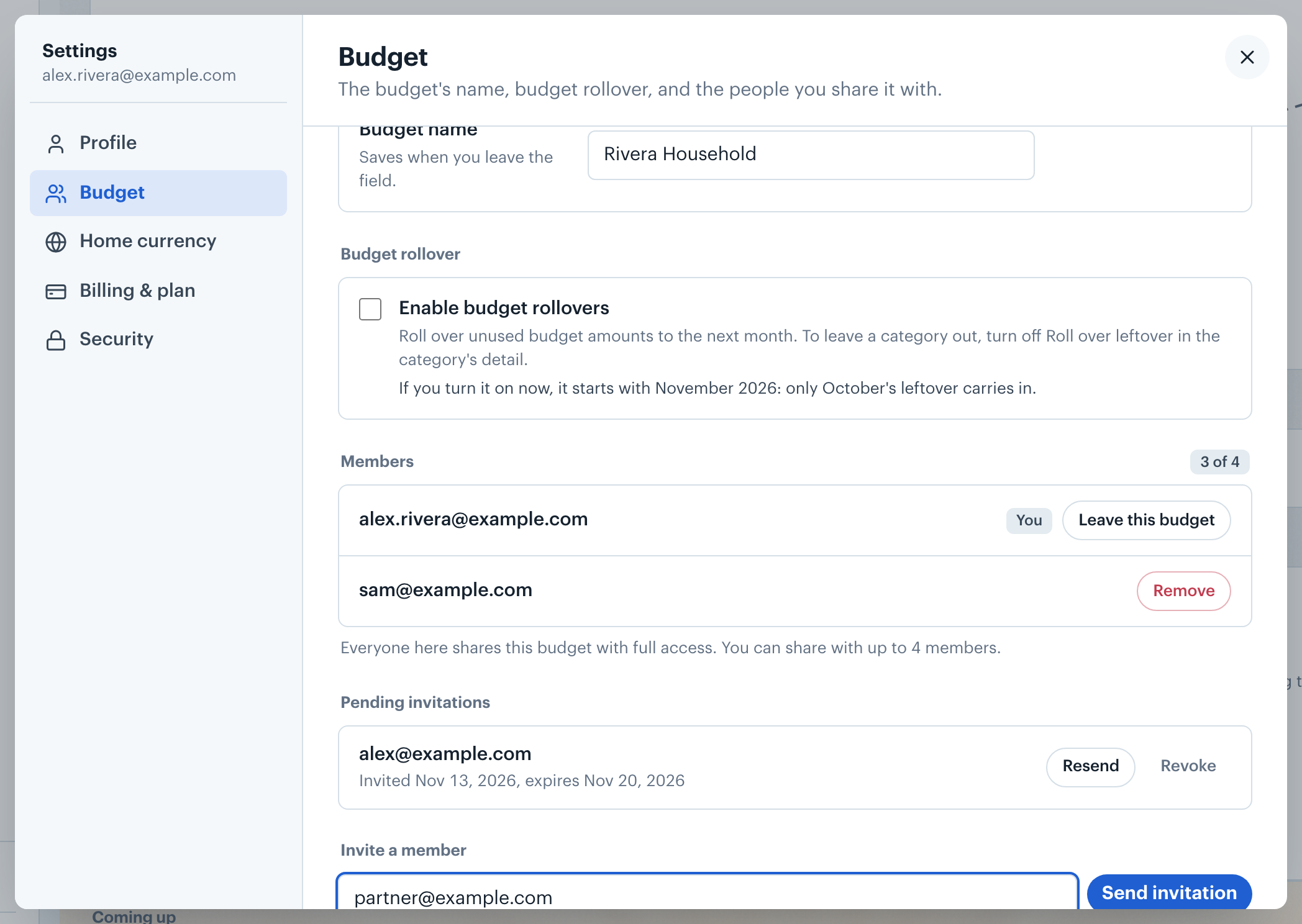
Get startedSteps to share a budget in Borderless Budget. Every member signs in with their own login and has full access to the same accounts, transactions, and budgets.
Note: Every member has full access. There are no view-only members, so only invite people you want to see and edit everything.
Invitations that have not been accepted yet appear under Pending invitations with their expiry date. Click Resend to send a fresh link (this restarts the 7-day window) or Revoke to cancel it.
The Members list shows everyone in the budget. Click Remove beside a member to remove them, or Leave this budget on your own row to leave. A budget holds up to 4 members, and pending invitations count toward that limit; at the cap, revoke a pending invitation to free a slot.
Members show by name, or by email until they add one. Each member sets their own name in Settings, on the Profile tab.
Want a member to look at a transaction? See Asking Someone to Review a Transaction.
Closing the budget entirely? See Deleting Your Account.
👋 Still have questions? Email [email protected].