
Related articles
Track your own money with Borderless Budget
Every account stays in its own currency, and every total adds up in yours. The first 30 days are free.
Get startedThe FBAR report lists each foreign account's highest balance in a year, in its own currency and in US dollars at the Treasury's year-end rate, shows how each figure was worked out, and downloads as a CSV for you or your preparer.
Every account stays in its own currency, and every total adds up in yours. The first 30 days are free.
Get startedSteps to open the FBAR report for a year, read each foreign account's highest balance and see how it was worked out. The report is a record for you or your tax preparer. It doesn't say whether you need to file, and Borderless Budget never files the FBAR for you.
The report is part of a Borderless Budget subscription. During a trial you can see which accounts are in it and how each value is found, but the amounts, the total, the CSV and Print unlock with your subscription's first payment.
The box at the top shows the Total of highest balances of the accounts in the report, in US dollars, and beside it At a glance: how many accounts are in the report, the highest single account and the exchange rate used for each currency.
When an account has no balance for the year, a line in the box says the total leaves it out, with Add the highest balance from your statement.

Accounts in this report lists each account with its Type · owner, its Highest balance in its own currency, the day it was reached (On), How we got it and the value In USD, rounded up to the whole dollar. How we got it reads Observed for the highest balance we recorded from your bank, Reconstructed when it's worked back from your balance through your transactions, or Your figure.
Click an account to see how its figure was worked out: a chart of its balances through the year, then the working, from the balance your bank reported to the Treasury rate and the dollars reported.
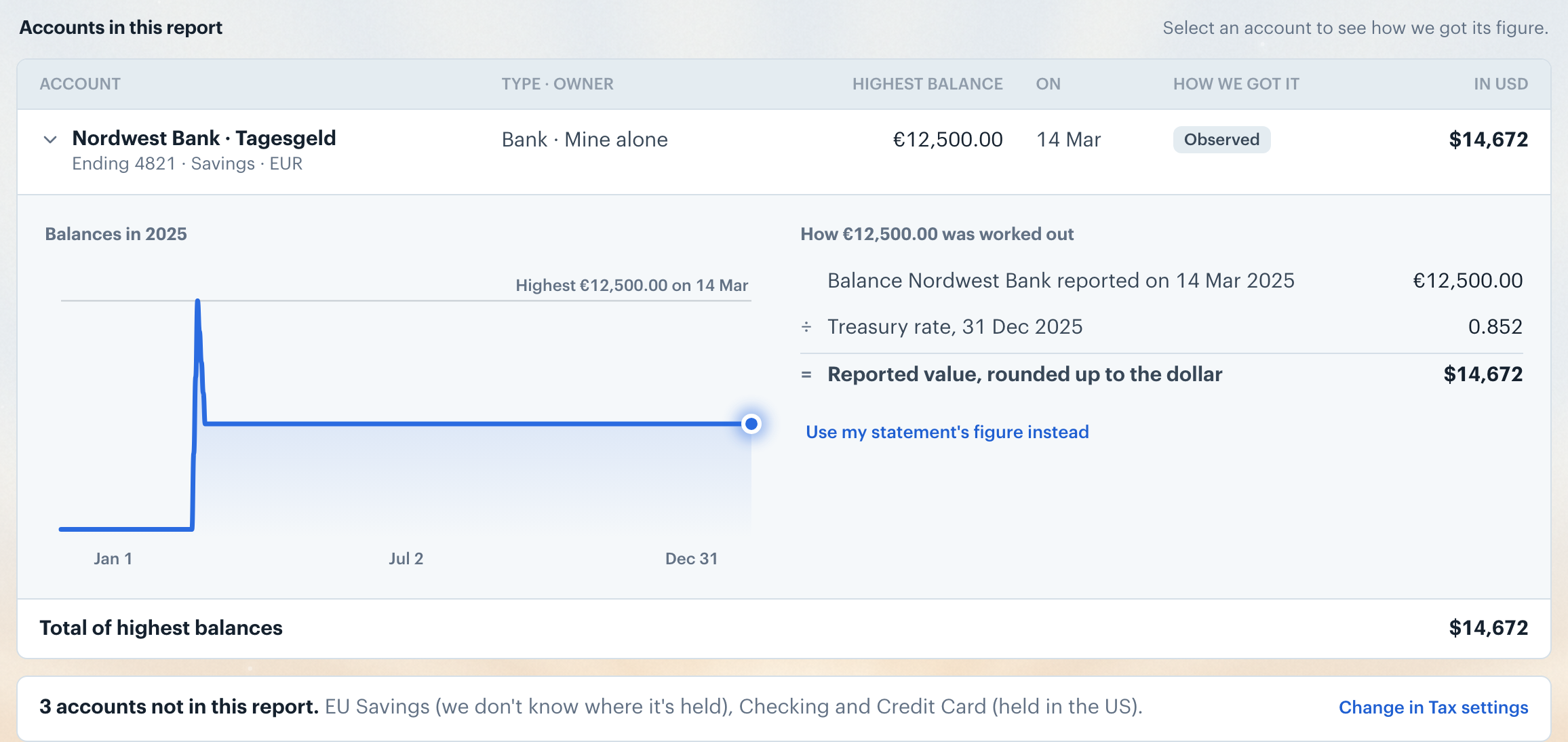
If your statement shows a different highest balance, click Use my statement's figure instead under the working. Enter the Highest balance, the Statement date and an optional Note, then click Save figure. The row then shows Your figure, and the working says what we calculated. If you can't find the amount, click Mark amount unknown.
The report lists the accounts your Tax settings put in the FBAR. Below the list, one line names the accounts that aren't in it and why, such as accounts held in the US. Click Change in Tax settings to change which accounts are in.
Want to set which accounts are foreign? See Answering Your Tax Settings.
Click Download CSV for a file to send your preparer or use to fill in FinCEN Form 114, or Print for a copy of the page. The CSV leaves out full account numbers and bank addresses: add them yourself, since we never store them. The notes at the end link Who has to file an FBAR? to FinCEN's own page.
Want an email before the FBAR deadline? See Notification Preferences.
👋 Still have questions? Email [email protected].