
Related articles
Track your own money with Borderless Budget
Every account stays in its own currency, and every total adds up in yours. The first 30 days are free.
Get startedA goal saves toward something inside your budget: a trip by a date, an emergency fund you keep, or a card you pay down. Each month's share is worked out for you, in any currency.
Every account stays in its own currency, and every total adds up in yours. The first 30 days are free.
Get startedBorderless Budget's Goals screen lists what you're saving toward, how much each goal holds and what it sets aside each month. A goal is a budget category in the Goals group, so its money stays inside your budget.
Open Goals from the sidebar, or from More on a phone, and click Add a goal. Before you have a goal, the screen asks What are you saving for? and offers a few starters, such as Emergency fund, A trip or Pay off a card or loan: each opens the sheet with the name, kind and icon filled in. Pick what it's for:
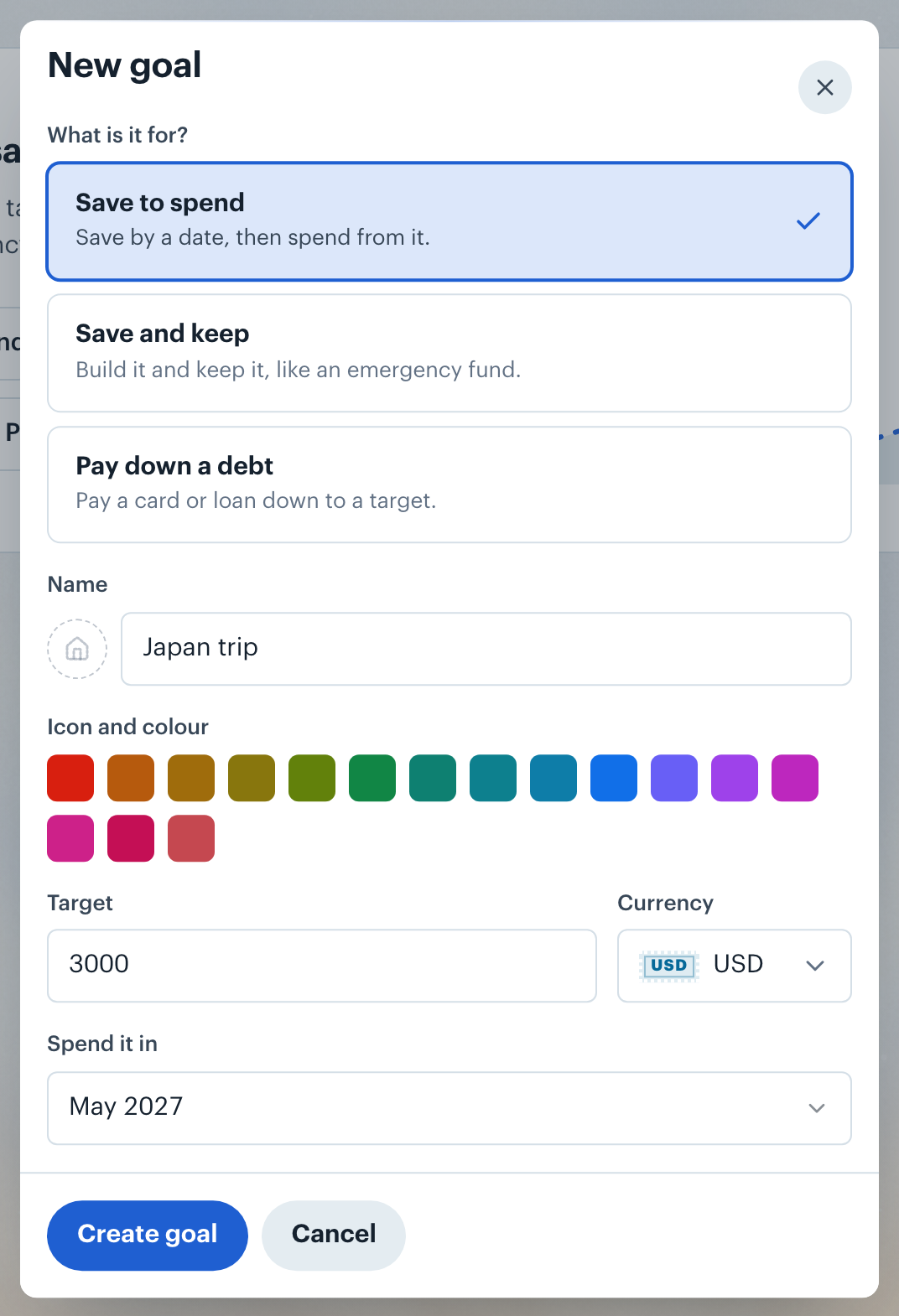
Give it a Name, a target and a Currency, then Create goal. The goal shows on the Goals screen, in a Goals section on Home and in the Goals group on the Budgets screen. A goal always rolls over, so what you budget and don't spend stays in it.
Each goal is a card with a ring that fills as it saves, the percent inside it and a check once it's there. Under the name are its progress, a forecast such as "On track for April 2027", "Full by September 2028" or "Debt-free November 2028", and its monthly share. Chips mark 25%, 50% and 75%, with how long until the next one, for example "50% in 3 months". A goal to keep also says what it covers, such as "Covers 3 months of your needs".

Once you have a goal to spend or keep, the top of the Goals screen adds up what they hold under Saved toward your goals, with how it changed this month and a line of the last six months. Beside it, last month's line says how much of the money planned for goals went to them. It also shows how many months in a row you've put money toward your goals and the latest milestone a goal passed, such as "Japan trip passed halfway in November." Debt goals aren't counted in the total.

A goal with a date splits what's still to save across the months left, this month included: "$250.00 a month until June 2027". A goal with no date sets aside the amount you enter under Each month instead. That share becomes the goal's budget each month, and the plan never budgets less than it.
A goal can be in any currency. A trip saved in euros shows its progress in euros, with your home-currency figure on the line below. Each month's share converts at that month's exchange rate, and months ahead use today's. If no rate is available yet, the goal shows in your home currency and sets no share until one is.
Want to know how conversion works? See International Currency.
Click a goal to open its detail. Monthly shares lists the share for each month ahead. Transactions in this goal opens its category, and spending from a goal is spending in that category, so a trip's purchases sit under Goals, not Travel. Edit goal changes the name, target, date and look. Archive goal removes it from Goals and Budgets.
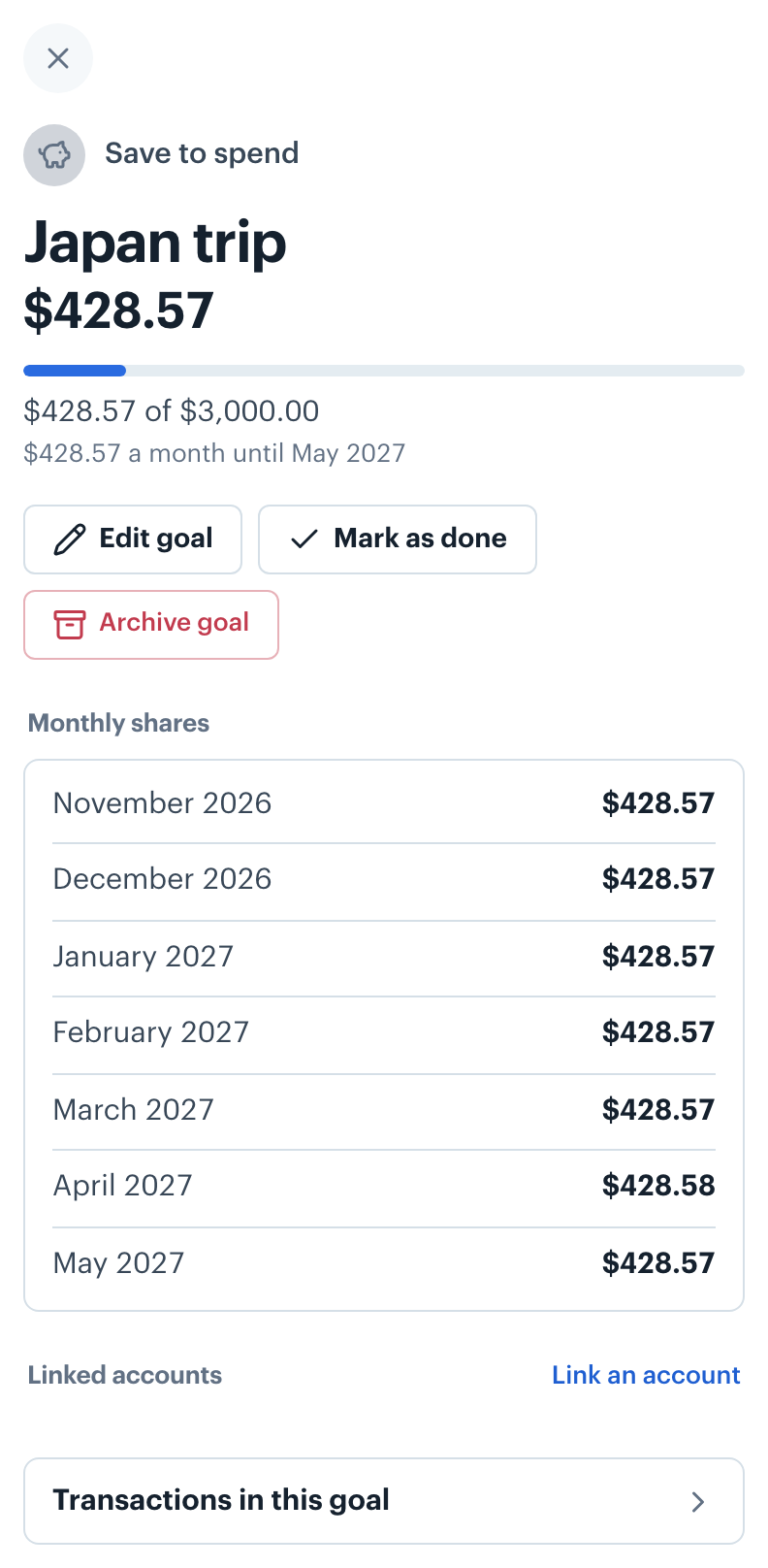
Under Linked accounts, Link an account ties the goal to the savings account that holds the money. Linking is optional, and several goals can share one account. The goal's progress is still what its budget holds. When a goal links an account, the Goals screen adds a check line, for example "Your linked accounts hold $5,000.00; goals here claim $4,200.00."
Saving in an account that doesn't connect? See Creating Manual Accounts.
A debt goal links one card, loan or mortgage. Its progress is that account's balance, for example "$2,400.00 left to pay, down to $500.00", and the share pays it down by the date you pick.
A goal to spend shows Ready to spend once it has saved its target, and Done once you've spent it down. A goal to keep shows Reached at its target. Its card then says how long it took, for example "You got there in 7 months, a month early.", and offers Mark as done. Mark as done stops a goal's shares, and Not done yet in its detail starts them again. The app never archives a goal for you.
When last month's income, after your other spending, didn't cover what you planned for goals, the Goals screen and Home say so: "October came in $200.00 short of the $900.00 planned for goals." On the Goals screen, last month's line under Saved toward your goals says it instead, for example "$120.00 short. Your goals still moved forward; the gap waits for next month." Nothing is moved: each goal keeps what it holds.
Below your goals, a recurring bill you set aside each month shows under Bills set aside, with how much is set aside and when it's due. Larger bills that come less often than monthly show under Bills you could set aside, biggest first, with what they come to each month and when the next one is due, for example "$118.97 a month · Next due 14 March": one charge has to be at least 1% of your average monthly income. Before you have a goal, the first three show under Or start with a big bill, and a link shows the rest. Set aside each month turns it on. If one isn't worth setting aside, the ✕ next to it (Not this one) removes it from the list, and Undo in the message brings it back.
Want to set one aside? See Setting Aside for Big Bills.
👋 Still have questions? Email [email protected].