
Related articles
Track your own money with Borderless Budget
Every account stays in its own currency, and every total adds up in yours. The first 30 days are free.
Get startedSpread a yearly or quarterly bill across your monthly budgets, so the month it's charged isn't a shock.
Every account stays in its own currency, and every total adds up in yours. The first 30 days are free.
Get startedSteps to spread a recurring charge that comes less often than monthly, such as a yearly insurance bill, across your monthly budgets.
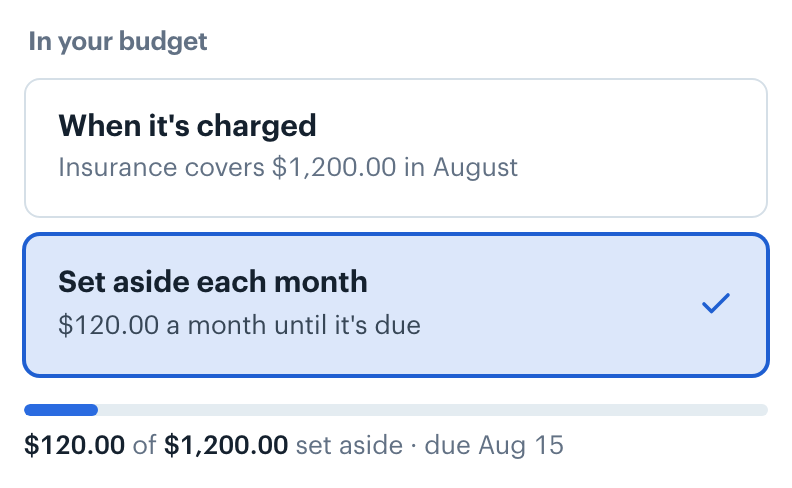
Open the charge from Recurring. Under In your budget, choose Set aside each month. When it's charged is the default: the category's budget covers the whole bill in the month it's charged.
Set aside splits what's still to save across the months until the bill is due, starting this month. The choice shows the monthly amount before you pick it. It's only offered for charges that come less often than once a month.
Switching changes the category's budget this month, and in any of the next 11 months that already have a budget, so it covers the new plan. A month without a budget yet starts from the month before, as usual. A message confirms how much is set aside each month. To undo, choose When it's charged again.
The category reads "$100.00 set aside for State Farm" under its bar, and the bar shows the money set aside after what you've spent. Left to spend and Remaining leave it out, so you can't spend it by accident.

The month the bill is paid, everything set aside comes back to pay it, and the category reads "State Farm was paid from $1,100.00 set aside since October 2025". If you switch back to When it's charged, or pause the charge past its due date, what was set aside comes back to the category that month instead. The category's detail lists every recurring charge in it with how much is set aside so far.
A bill you set aside is also listed on the Goals screen under Bills set aside, with how much is set aside and when it's due. It stays a recurring charge. Bills you haven't set aside yet show under Bills you could set aside, with a button to turn it on.
Saving toward something that isn't a bill? See Saving for Goals.
👋 Still have questions? Email [email protected].