Budget styles · Updated 20 November 2026 · 7 min read
What it is
The 50/30/20 rule splits your after-tax income three ways: no more than 50% to needs, no more than 30% to wants, and at least 20% to savings and debt payments.1 Needs are what you'd struggle to stop paying: housing, groceries, utilities, insurance, minimum loan payments. Wants are the rest of your spending. Savings is everything you put away.
Where it comes from
Elizabeth Warren and her daughter Amelia Warren Tyagi set out the rule in their 2005 book All Your Worth: The Ultimate Lifetime Money Plan.1,2 Its appeal is that it's three numbers, not thirty: you don't budget each category, you check three totals against your income.
Who it suits
- People with a fairly steady income who want a quick check on whether their spending is in proportion.
- Anyone who finds category budgets fiddly. Three numbers are easier to keep an eye on than a dozen lines.
It's harder where needs alone take more than half of what you earn, as they often do in an expensive city or on a low income. The plan will say so every month. That's useful information, not a failure, but a style like pay yourself first may be easier to live with.
How Borderless Budget does it
50/30/20 in Borderless Budget shows the gap and funds your goals. It doesn't trim your other categories to fit: each bucket shows what it holds against its share of income, and you decide what to change. The 20% goes to your goals, because in Borderless Budget saving is a goal.
Set it up in Borderless Budget
1.Open Plan style on Budgets
On a computer, the Plan style button sits in the Categories toolbar, after How much to budget. On a phone it's a row above your categories.
2.Choose 50/30/20
It saves as soon as you pick it. 50/30/20 needs income to plan with, so it's unavailable until the app sees a month of income, and says so: "50/30/20 needs a month of income to plan with."
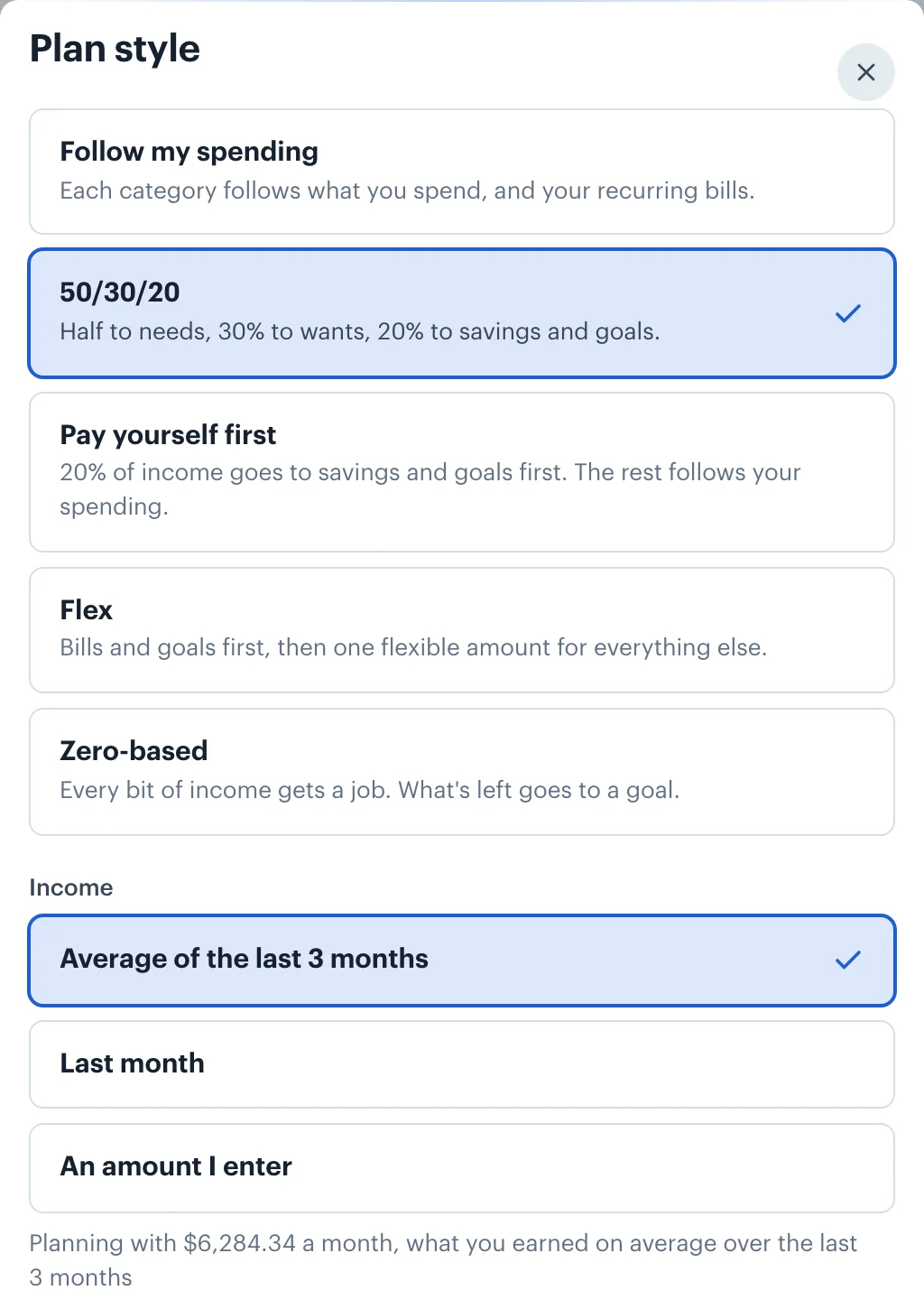
3.Pick the income to plan with
Under Income, choose the Average of the last 3 months, Last month, or An amount I enter. Income is the money categorized as Income that reaches your accounts, so it's already take-home pay, the figure Warren and Tyagi split.
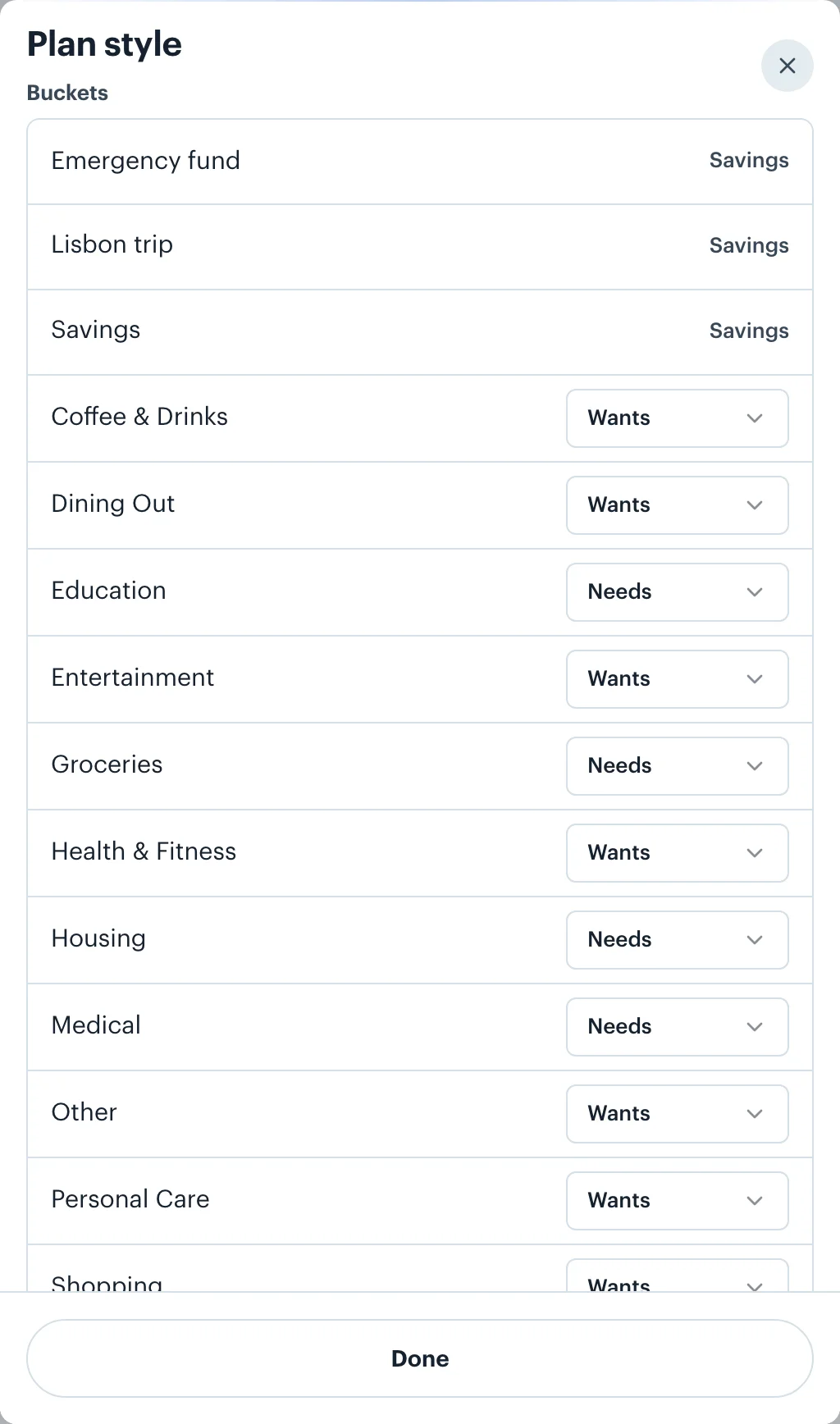
4.Check which categories are needs and wants
Every spending category starts in the usual bucket: housing, groceries and medical are needs, dining out, shopping and entertainment are wants. Change any of them under Buckets in the plan style sheet, or from a category's ⋯ menu, under Bucket. A category can also have No bucket. Goals are always Savings.
5.Read the plan under Left to spend
The plan sits in the Left to spend card at the top of Budgets: one bar of your income split into needs, wants and savings, with dashed marks at 50% and 80%, so you can see at a glance which bucket runs over. Under it, each bucket reads its share of income against its target and how far off it is: Needs "54% of 50", "$257.83 over". To close a gap, lower a few categories by typing new amounts, or give one a rule, such as a set amount each month.
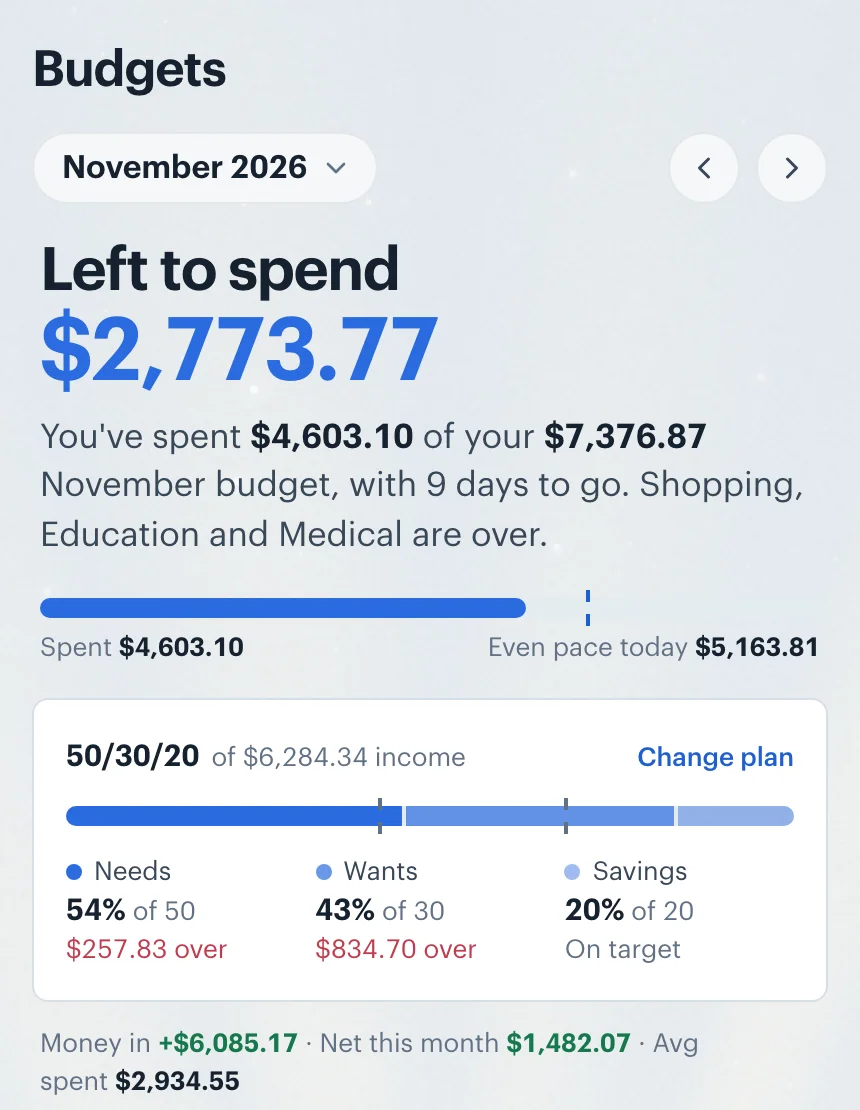
How goals fit in
The Goals group is the Savings bucket, and 50/30/20 fills it to 20% of income in a set order. Goals with a date get their monthly share first. Whatever is left of the 20% is split evenly between the goals without a date. In the example above, the 20% is $1,256.87: a Lisbon trip due in June takes $331.36, and an emergency fund and an open-ended Savings goal share the remaining $925.51. If you have no goals at all, choosing 50/30/20 creates an open-ended "Savings" goal so the 20% has somewhere to go.
Warren and Tyagi count debt payments in the 20%.1 In Borderless Budget, minimum payments sit in needs, and paying a card or loan down faster is a goal: choose Pay down a debt when you create it, and its share counts toward Savings.
Irregular or no income
The rule is a share of income, so with no income there's nothing to split, and the style can't be chosen until a month of income arrives. If your income comes in lumps, the 3-month average smooths it. If you'd rather plan on a figure you're confident of, choose An amount I enter. Either way, the plan measures your budget against that figure, and the Goals screen tells you when a month's income, after your other spending, didn't cover what you planned for goals.
Money in more than one currency
The split is of your income in your home currency, wherever it was paid. In the screenshots, a salary paid in dollars and a monthly invoice paid in euros both count, each converted at the rate for the day it arrived. A goal saved in another currency counts toward Savings at its converted share for the month. For a mixed income the percentages move a little with exchange rates, which is the truth about a mixed income. How currency conversion works.
 Borderless Budget
See your month in one currency
Connect your accounts in each country you bank in, and Borderless Budget shows the month in your home currency, every original amount kept. Borderless Budget has a 30-day free trial, then costs $14.99 a month or $109 a year, billed in USD, with every feature and up to 10 connected banks included.
Sources
- 1. Experian, What Is the 50/30/20 Budget Rule?, 20 April 2026, accessed 20 November 2026. The split of after-tax income, and the book Elizabeth Warren wrote with Amelia Warren Tyagi in 2005.
- 2. Open Library, All Your Worth, Elizabeth Warren and Amelia Warren Tyagi, Free Press, first published 2005, accessed 20 November 2026.
More budget styles
- Follow my spending: The default. Each category's budget comes from your own recent spending and your recurring bills, and keeps itself current as months close.
- Pay yourself first: 20% of income goes to savings and goals before anything else, and every other category keeps following your spending.
- Flex: Cover your bills, set-aside bills and goals first, then watch one flexible amount for everything else instead of a dozen categories.
- Zero-based: Plan income minus every category down to zero, with whatever is left going to a goal you choose. Measured against the income you budget for the month.
- All five styles compared