Budget styles · Updated 20 November 2026 · 6 min read
What it is
Flex budgeting splits spending into what's settled and what isn't. Rent, insurance, subscriptions and the money you've promised your goals are settled: you decide them once. Everything else, the groceries, meals out, shopping and weekends, shares one flexible amount, which is what your income leaves after the settled things. During the month you watch that one number.
Where it comes from
The name is Monarch's. Its flex budgeting puts expenses in three buckets, fixed, non-monthly and flexible, and works out the flexible amount as income minus fixed expenses, non-monthly expenses and goals.1 Borderless Budget follows the same idea, with goals and set-aside bills standing in for the non-monthly bucket.
Who it suits
- People who don't want to manage a dozen category budgets. One number is easier to keep in your head.
- Households whose fixed costs are steady and whose everyday spending moves around between categories from month to month.
It suits you less if you want to know exactly how much went on dining out against a plan for dining out. The categories are still there and still tracked, but Flex judges them together.
How Borderless Budget does it
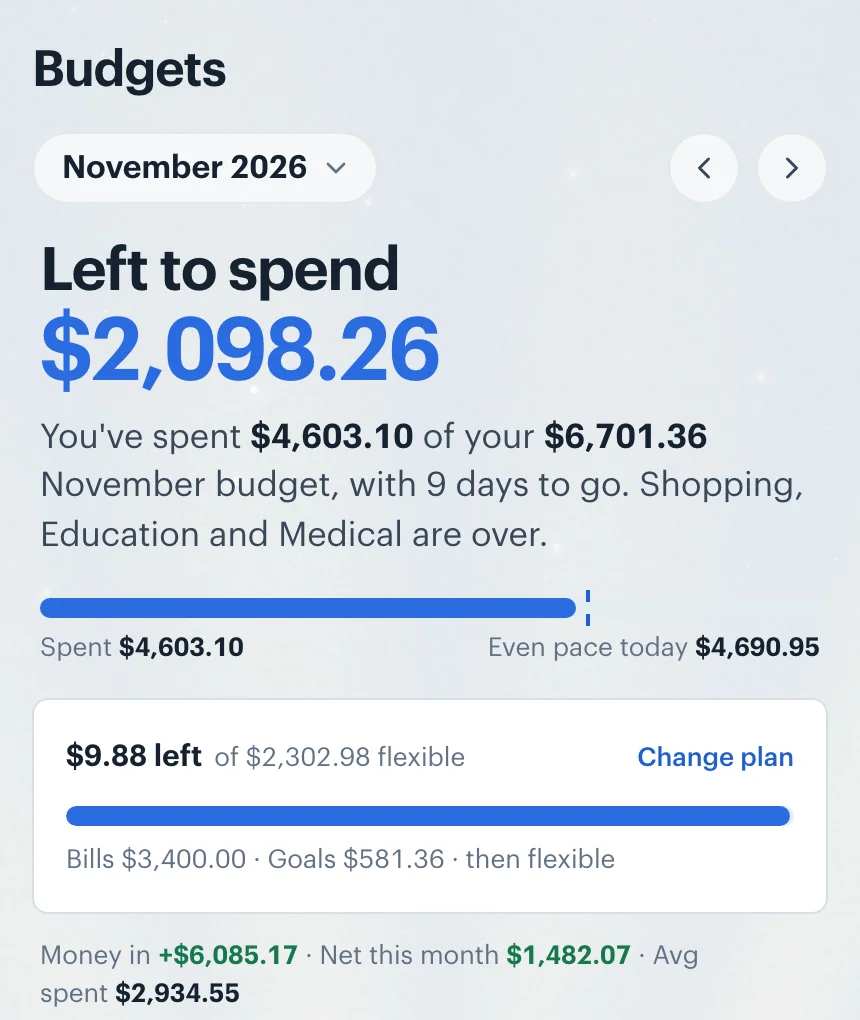
Your Wants bucket is the flexible part. Flex works out what your income leaves after every category that isn't a want, and after your goals: that's the flexible amount. At the top of Budgets it shows how much of it is left after what your want categories have spent this month, "$9.88 left of $2,302.98 flexible", and what bills and goals take first. It measures; it doesn't rewrite the want categories, so you choose where to trim.
Set it up in Borderless Budget
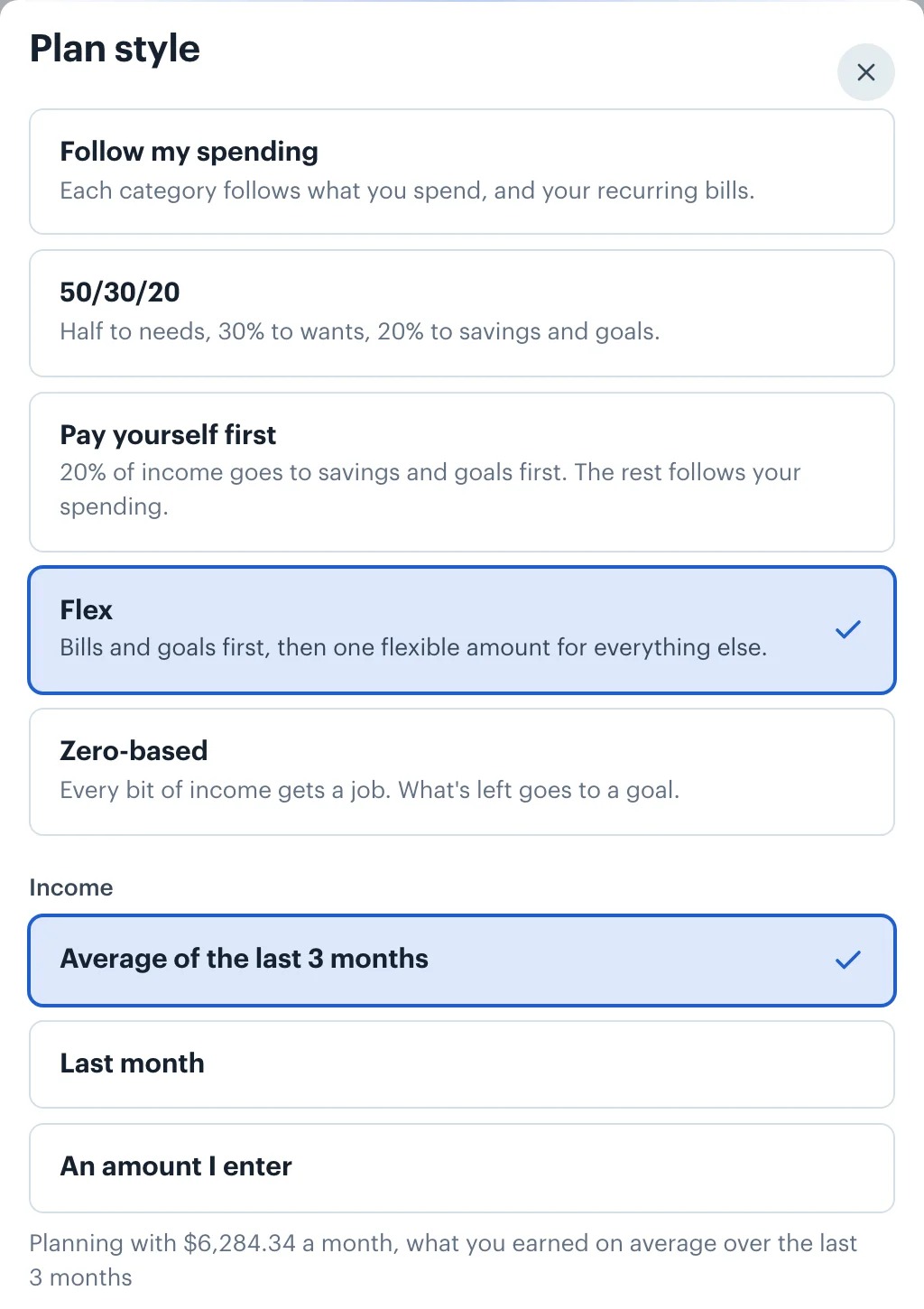
1.Open Plan style on Budgets and choose Flex
The Plan style button sits in the Categories toolbar on a computer, and is a row above your categories on a phone. The style saves as soon as you pick it, and needs a month of income before it can be chosen.
2.Pick the income to plan with
Choose the Average of the last 3 months, Last month, or An amount I enter. The flexible amount comes out of that figure.
3.Decide what's flexible
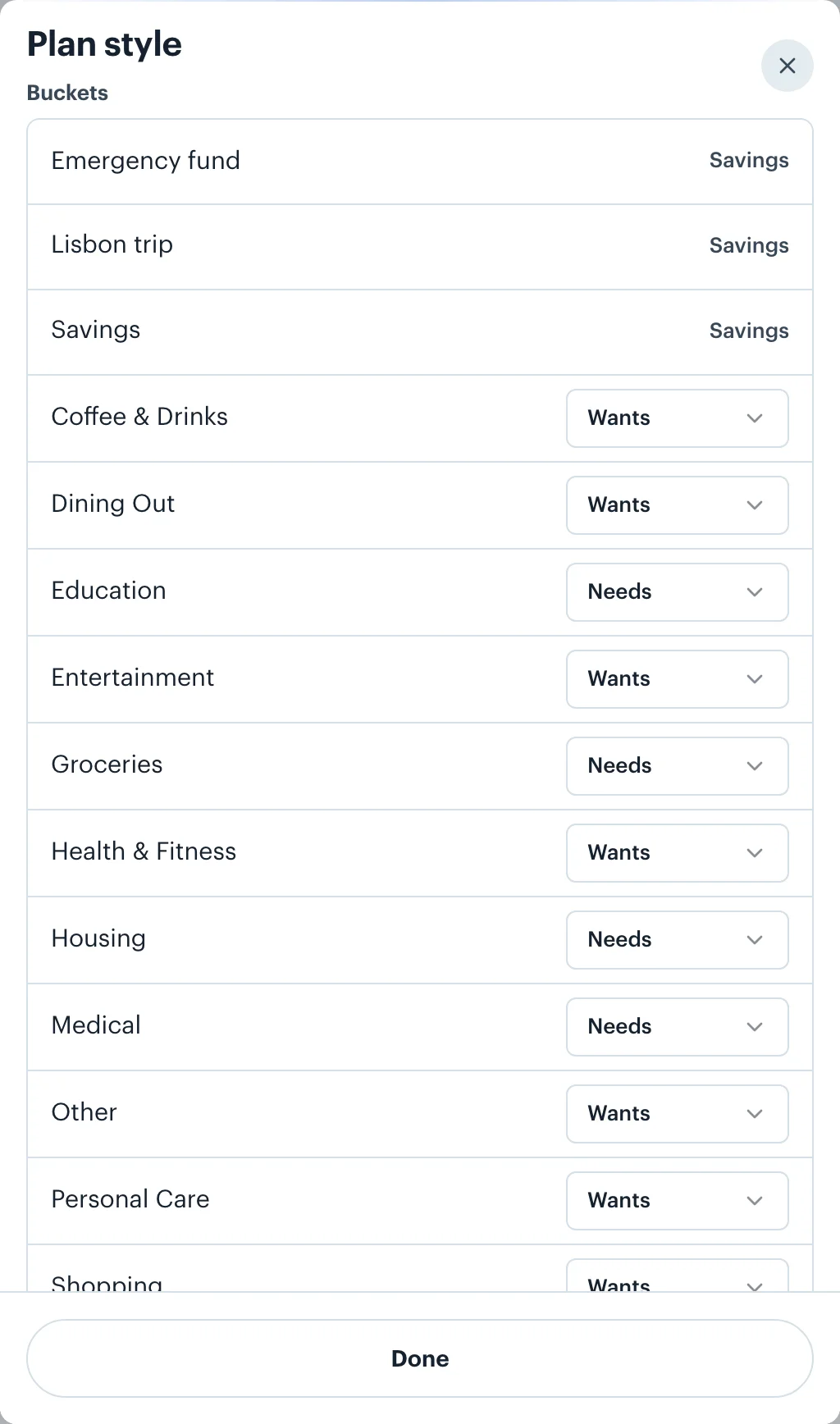
The categories in your Wants bucket make up the flexible amount. Every spending category starts in the usual bucket, with dining out, shopping and entertainment as wants and housing, groceries and medical as needs. If you'd rather count groceries as flexible, move it to Wants under Buckets in the plan style sheet, or from its ⋯ menu.
4.Settle the bills that don't come every month
A yearly insurance premium or tax bill can be set aside each month, so it becomes a steady monthly amount instead of a shock. Turn it on from the recurring bill, or from Bills you could set aside, below your goals on the Goals screen (with no goals yet, under Or start with a big bill). Setting Aside for Big Bills explains how.
5.Watch the flexible amount
The plan sits in the Left to spend card at the top of Budgets. Its bar fills as your want categories spend, and the line above it says how much of the flexible amount is left. When spending passes it, it reads "over" instead: spend less on wants for the rest of the month, or lower a fixed category's budget so more is flexible.
How goals fit in
Goals come off the top, before the flexible amount is worked out. A goal with a date gets its monthly share, what's still to save split over the months left; a goal with no date gets the amount you set under Each month. Unlike 50/30/20 and pay yourself first, Flex doesn't top goals up to a percentage: it funds what you ask for and leaves the rest flexible. In the screenshot, the goals take $581.36 together, the Lisbon trip's $331.36 and the emergency fund's $250.00.
Irregular or no income
The flexible amount is what income leaves, so Flex needs income and can't be chosen until a month of it arrives. With uneven income, the 3-month average gives a steadier flexible amount than last month alone. If a lean month is likely, An amount I enter lets you plan on the income you can count on, so the flexible amount is one you can actually spend.
Money in more than one currency
Everyday spending abroad lands in the same flexible amount: a dinner in euros and a train ticket in pounds are converted at the rate for their dates and count against one number in your home currency. Bills and goals in other currencies are converted at each month's rate before the flexible amount is worked out, so if the euro rises, a euro goal takes a little more and the flexible amount gets a little smaller. How currency conversion works.
Want every category planned to the last unit instead? See zero-based budgeting.
 Borderless Budget
See your month in one currency
Connect your accounts in each country you bank in, and Borderless Budget shows the month in your home currency, every original amount kept. Borderless Budget has a 30-day free trial, then costs $14.99 a month or $109 a year, billed in USD, with every feature and up to 10 connected banks included.
Sources
- 1. Monarch, Flex Budgeting: The One-Number Budget That Actually Sticks, 17 November 2024, accessed 20 November 2026. The three buckets, and income minus fixed expenses, non-monthly expenses and goals as the monthly flex number.
More budget styles
- Follow my spending: The default. Each category's budget comes from your own recent spending and your recurring bills, and keeps itself current as months close.
- 50/30/20: Elizabeth Warren and Amelia Warren Tyagi's split of take-home pay: half to needs, 30% to wants, 20% to savings and goals, and how far you are from each.
- Pay yourself first: 20% of income goes to savings and goals before anything else, and every other category keeps following your spending.
- Zero-based: Plan income minus every category down to zero, with whatever is left going to a goal you choose. Measured against the income you budget for the month.
- All five styles compared